·
Pixel Art Pixel art is artwork created from a game which is a raster image made up of pixels. They are edited on a pixel level and is mostly used in mobile games. Most pixel art is 2D and an example of a game that uses pixel art is Mario Bros. Pixel art was used in most early games and is still used today as it is very popular.
Isometric Pixel Art is where the image is still a raster image however it looks three dimensional. An example of a game which uses isometric pixel art is Minecraft as it is made up of pixels but looks 3D. ·Concept Art
Concept art for games art usually illustrations created by designers to convey an idea for the game. Concept art for video games could include characters, weapons or environment. Concept art is also referred to as visual development or concept design.
·Texture Art Texture artists create textures for certain things in the game, for example they could texture a building in a video game, or the clothes for a character in a video game. texture art is key in video games because everything we see in a video game has to have a texture for it. In some cases a texture artist will create a texture for a character and wrap it around a pre-made body shape to create a textured sprite, this is called a skin net.
·
Background Graphics
Background artists do not deal with the looks of the characters but often deal with the things we see in the background. this is easiest to notice in games like Mortal Kombatwhich have a side onview. although it tends not to be too noticeablein these games as we mainly focus on characters the background graphics play a huge aspect in making the game feel and look good.
·
Print Media Art Print media art is usually created alongside a video game. Example of print media art include posters, printed T-shirts, concept art books and even the video games case cover or disk cover. This makes more money for the company by selling these products alongside their main product.
Photorealism was an American art movement that began in the 1960s, taking photography as its inspiration. Photo-realistic painters created high quality images that referred to the reproduced image. In games photorealism is basically where the game looks indistinguishable from a photo. For example The Last Of Us is a photorealistic game as it looks like a photograph. The problem for games is that the game has to be rendered in and this requires alot of processing power.
The last of us remastered uses a photorealistic graphic design which makes the game look good. this graphics style attracts people to buy the game. Personally I enjoy playing games with a photorealistic art style more than any of the others because the realistic graphics add a deeper sense of immersion to the game, unlike games which use abstraction.
·Cell Shading
Cell shading is a type of non realism rendering designed to make 3D computer graphics appear to be flat by using less shading colour. This gives the image a cartoon look and has been used in many games such as borderlands, Legend Of Zelda remastered and Crackdown.
Borderlands 2 uses cell shading to give a different aspect of looks to there game, this is why it stands out in the fps market and why it attracts people to buy the game. I think that this graphic style is good for games which are more fun than serious. For example it fits Borderlands because its a game about fighting strange enemies in a post-apocalyptic world. ·Abstraction
Abstraction is when an image is made up of shapes and colour that are non representational. Its focused on shapes, colour and movement. These types of games usually have no story line and are usually indie or mobile games. Games which use abstraction include Tetris and Geometry wars.
Games that use an abstract graphic style are usually made by indie developers. Most of the more well known companies are able to put more money into there games and get a higher quality graphics style such as photorealism. In my opinion, games which use abstract graphics styles tend to be mobile games, I don't really enjoy these games as there is no storyline or actual characters and I prefer it when games have an entertaining story. ·Exaggeration
Exaggeration is typically used in anime/manga video games, this is where the artist exaggerates many things in the game. Also the music adds to the exaggeration as there is usually some thrilling music during points in the game, such as fight scenes. This mostly happens in games with a Japanese influence such as the Final Fantasy games.
I enjoy games which use exaggeration as the art style is very intriguing and usually have a powerful storyline. The Naruto Ultimate Ninja series is another example of an exaggerated graphic style in video games.
Pixels are the building blocks of all images in digital form, all screens display in pixels. For example the image above is made out of few pixels so we can see the square pixels. A resolution such as 1920 by 1080p is made up of 1920 pixels width by 1080 pixels high meaning a total of 2,073,600 pixels on a screen. The name pixel comes from picture element. Colour depth is the number of colours available to a pixel, 1 bit colour depth is comprised of 2 colours where as true colour (24 Bit) is comprised of 16,777,216.
RGB colour is made up of red, green and blue and is the colour model used on screens. The red, green and blue light needs to be added to create a white, thus why it is additive. CMYK colour is made up of cyan, magenta, yellow and black and is the colour model used for printing images. The colours need to be taken away from the image to create white which is why it is subtractive.
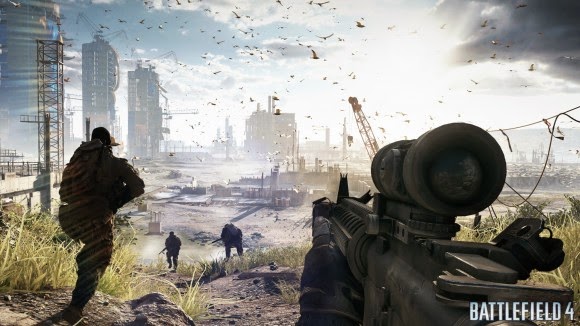
Resolution is the quality of an image, as resolution goes up the quality increases. Resolution measures the amount of pixels an image can be on a screen. For example the image above shows a videogame being displayed in a 1920 by 1080 pixel resolution. However there are more factors which can affect the way an image looks, the distance away from the screen affects the way we see the image because if we are to close the image can look slightly pixelated and can ruin the look of it.
A raster image is a image composed of pixels, it can be scaled down but not up as when it is scaled up it becomes pixelated. Raster images are usually used for picture editing and saving photos. Files formats used for raster images include PSD, BMP, GIF, TIFF, JPG and PNG.
PSD-Photoshop document
BMP-Bitmap
GIF-Graphics interchange format
TIFF-Tagged image file format
JEPG-Joint photographics expert group
PNG-Portable network graphics ·Vector
Images: file formats and uses - eps, wmf, fla, svg, ai
Vector images are made using mathematical equations which tell the program what to do. Vector images can be created in adobe illustrator. Vector images can be scaled up or down and will not get pixelated. Format files or vector images include EPS, WMD, FLA, SVG and AI. AI is the adobe illustrator default file format. Vector images are usually used in banners or logos because when they are scaled up they don't become pixelated.
EPS-Encapsulated post script
WMD-Windows media download file
FLA-flash application file
SVG-Scaleable vector graphics
AI-Adobe illustrator file
·Cross-platform
Images: format and uses - pdf A PDF file is a portable document format file. When a file such as a document , image or website is converted to a PDF they look just like they would if printed, but unlike printed documents they can contain clickable links, buttons, video, audio and images. They can be read using Adobe acrobat.
·Compression
- lossy and lossless Lossy compression is when a image is compressed to a smaller file size but it loses some data. This makes the image become blocky (pixelated) and loses quality however the amount of pixels in the image does not change but the pixels copy data from nearby pixels which makes i look blocky.
Lossless compression is when an image is compressed partially but not as much as lossless compression. Also lossless compression doesn't lose any data therefore it retains it quality and does not become blocky unlike lossy compression.
·Image Capture Devices – scanner, digital camera,
tablet/smartphone
All capture devices use a lens which gathers and focuses light. The local point is the point in which the image flips around because the light rays continue going in the same direction they are. In digital cameras, tablets and smartphones the sensor which contains photosites converts the light into an image, each photosite represents one pixel in the final image so when the image is taken it has the same amount of pixels as the sensor. e.g. a 4 megapixel camera would have around 4 million pixels in the final image.
A chemical camera uses RGB colour dyes to take an image but is basically the same concept as a digital camera. In a scanner the sensor scans the image by lines of pixels to take an image instead of taking all the pixels at once like a digital camera.
·Optimising Optimising is where you change settings, file format, colour models and other things to get the best possible image from the software you are working from. For example if you are playing a game you could optimise that game to get the best possible experience out of it by changing settings. Also if you are going to print an image you have saved as a PSD you will optimise it by changing the colour model to CMYK and by changing the file format to PDF which is a cross platform file format.
·Storage
and Asset Management
Storage management is where you save all of your files to make it better to access and more convenient for you. For example if you have to take in work to college you may save it on a usb, skydrive or send it to yourself over email.


.jpg)

.jpg)

.jpg)